Mackie Control Protocol (MCP) Integration
ParksTool MIDI controllers can send Pitchbend and Vpot messages. They support Mackie Control Protocol (MCP).
Important
Support here means that the product can send the messages that MCP uses. This product does not announce itself as a Mackie Control device, and it does not receive screen text or meter displays back. This setup is therefore for controlling a device that receives MCP messages, such as a Sound Devices recorder, and is not for registering the product as a HUI / Mackie Control surface in a DAW. In a DAW, connect it with MIDI Learn - see Integration with DAW and DJ Software.
Key MCP Function Mappings
You can configure each element of the ParksTool controller for the MCP protocol as follows:
Fader (Volume Control): Uses Pitch Bend messages. (14-bit high-resolution control)
V-Pot (Pan/Trim, etc.): Uses Relative CC mode or dedicated encoder mode.
Button (Transport/Function Control): Uses Note On/Off messages.
Bank Change: Use Note On messages to shift by 8 channels.
Note
Specific Note numbers or CC values may vary depending on the MCP implementation of the software/hardware you are using.
Usage Example: Sound Devices 8-Series
Recorders like Sound Devices 833 and 888 support the MCP protocol, allowing for external fader expansion. Below is a configuration example for controlling channel 9-12 faders using the ParksTool 4ES-2K model.
4ES-2K (4 Encoder + 2 Key) Setup Guide
This setup works by configuring encoders as Pitch Bend and using the Key function to Shift channels.
Important
This setup is an example based on the 4ES-2K model. If you are using other ParksTool products, you must adapt the settings to match your hardware configuration. The basic MCP protocol principles (Pitch Bend fader control, Note 46/47 bank switching) apply identically to all products.
1. Encoder (Dial) Setup (Fader Function)
Configure the 4 encoders (dials) of the 4ES-2K to operate as faders for the Sound Devices 888.
Setting Item |
Setting Value (Each Encoder) |
Remarks |
|---|---|---|
Function |
Pitch Bend |
|
Value |
1, 2, 3, 4 |
Set each encoder to Pitch Bend 1, 2, 3, 4 in order. |
Note
This setting initially controls Channels 1-4 of the mixer. You will switch to Channels 9-12 control via the Channel Shift Key setting in the next step.
2. Key Setup (Channel Shift Function)
Assign a Bank Change command to signal the Sound Devices recorder that you want to “control the next 8 channels”.
+8 Channel Shift (Bank +)
Setting Item |
Setting Value |
Remarks |
|---|---|---|
Function |
Note |
Use Note On message |
Channel |
1 |
|
Note |
47 |
Note 47 (B2) performs the +8 Channel Shift function. |
Speed |
127 |
Optional: Channel Shift Return Function (-8 Channels)
Setting Item |
Setting Value |
Remarks |
|---|---|---|
Function |
Note |
|
Channel |
1 |
|
Note |
46 |
Note 46 (A#2/Bb2) performs the -8 Channel Shift function. |
Speed |
127 |
3. How to Use
Set the 4ES-2K encoders to Pitch Bend 1, 2, 3, 4 as configured above.
Connect to Sound Devices.
Initially, the encoders control channels 1-4.
Press the channel shift key set to Note 47 (B2) once.
Now the 4ES-2K encoders will control the faders for Channels 9, 10, 11, 12 of the Sound Devices 888.
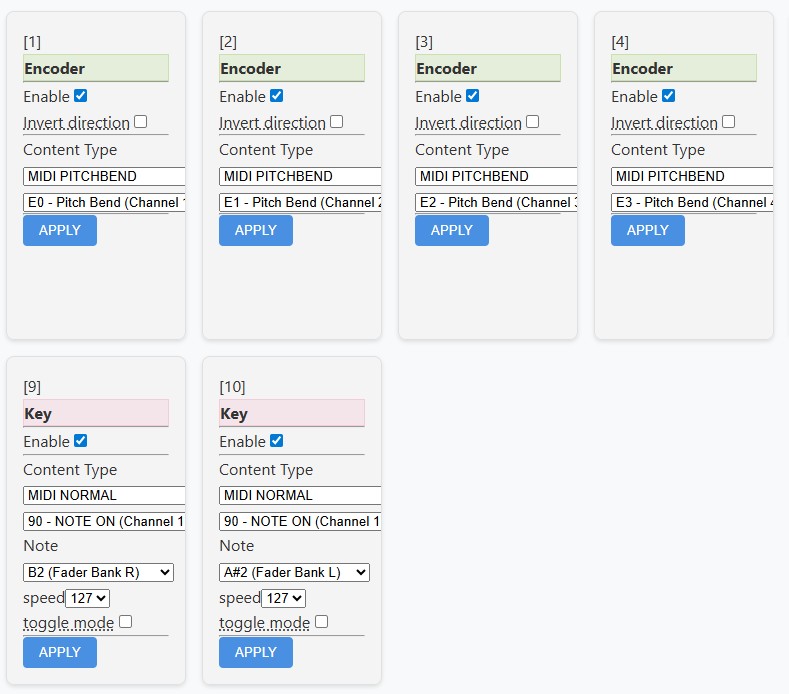
4ES-2K Setup Example: Encoders are set to Pitch Bend, and Keys are set to Note B2(47)/A#2(46) to implement bank switching.
Additional Info: Trim (Gain) Control
To control input trim (Trim/Gain) in addition to faders, you can use the vpot function.
Function: MCU vpot (Input Trim control)
Setting: Set ParksTool encoders to MCP vpot mode (or CC Relative).
Sound Devices Setting: To smoothly control the full trim range of 833/888, it is recommended to adjust the Potentiometers Divider value for the corresponding encoder in the Web Configuration Tool.
Note
In Firmware v8 or later, the existing ‘Resolution’ setting has been changed to Potentiometers Divider. This value determines how many messages to send within the full rotation range of the potentiometer. For smooth vpot control, you should set this value sufficiently high and experiment to find the optimal sensitivity.
Easy Setup using Presets
If manually entering MCP settings is tedious, you can use the Preset function.
By loading a Preset with pre-applied vpot and pitchbend settings from the ParksTool Web Configuration Tool, you can easily configure VPOT or Pitch Bend initially. Other detailed settings must be modified separately.