ファームウェアアップデート
ファームウェアアップデート前に設定のスクリーンショットを撮っておくことをお勧めします。特に大きなバージョン変更では既存の設定をやり直す必要がある場合があります。
ファームウェアは専用 PC ツール(ParksTool Uploader)で更新します。下記の GitLab リリースページから入手できます。
ファームウェアアップデートプロセス
リリースダウンロードページ にアクセスして、最新の ParksTool Uploader を入手してください。Windows は
parkstool-updater-<バージョン>-windows.zip、macOS はparkstool-updater-<バージョン>-macos.app.zipです。ダウンロードしたファイルを実行します。
Windows:
.zipを解凍し、中の ParksTool Uploader 実行ファイル(.exe)を起動します。macOS:
.app.zipを解凍して.appを実行します。署名されていないアプリのため、初回のみ右クリック → 開くで許可する必要があります。
USB ケーブルを接続し、ツールの Auto Update ボタンを押します。デバイス検出 → アップロードモード移行 → ファームウェア書き込みまで自動で進み、完了すると Configurator 画面が自動的に開きます。
注釈
If power is cut during the update, the device may become bricked. Do not disconnect the USB cable during firmware update. If the device is bricked, see the "Brick recovery" section below.
以前の方法(レガシー)
以前は zip ファイル内の
uploader_windows.exe/uploader_macを実行し、macOS では右クリック → ターミナルで開くで起動する方式でした。この方法は現在は推奨されません。上記の ParksTool Uploader(GUI)を使用してください。
アップデートツール (ParksTool Uploader)
ParksTool Uploader はファームウェア 9.3.5 と同時に新しく作られたデスクトップツールです。従来の単なる .exe ではなく本格的な GUI アプリケーションで、ファームウェアの更新だけでなく、デバイスの設定や診断まで一箇所で扱えます。
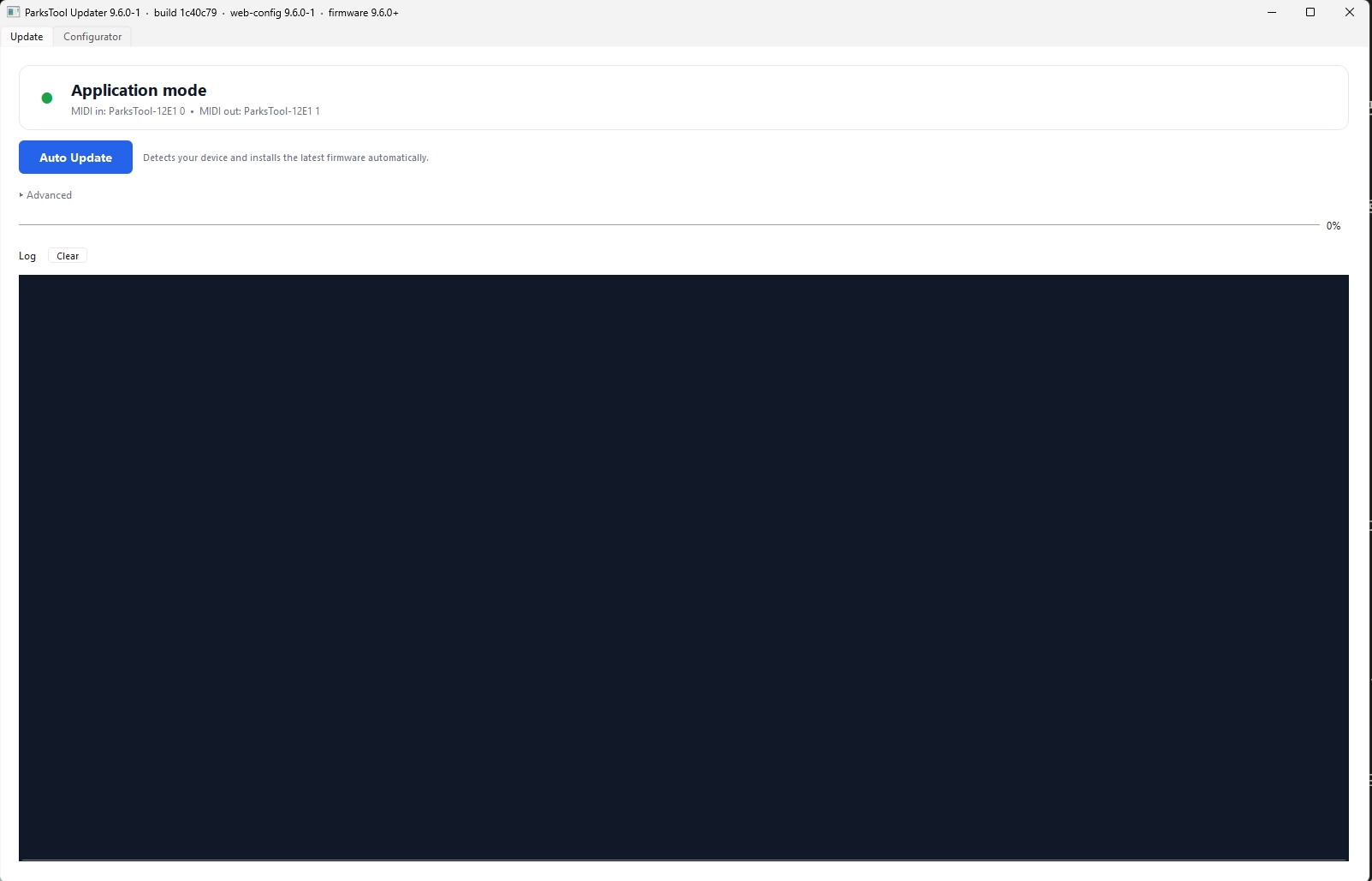
USB ケーブルを接続すると上部にデバイスが認識され(緑のインジケーター + MIDI in/out 名)、中央の大きな Auto Update ボタンを押すだけで最新ファームウェアが自動的にインストールされます。デバイスの設定は Configurator タブで行います。
主な特徴:
自動検出 + ワンクリック更新: USB ケーブルを差して
Auto Updateボタンを押すだけ。ツールがデバイスを認識し、アップロードモードへの移行とファームウェア書き込みを一度に行います。ボタンを押し続けるとか、タイミングを合わせるといった操作は不要です。内蔵 Configurator タブ: 別途ブラウザを開かずにツール内で直接デバイスを設定できます。インターネット接続がなくても動作します — Configurator UI とファームウェアファイルがツール本体にバンドルされています。
ファームウェアバージョン自動マッチング: デバイスの現在のファームウェアバージョンを読み、それに対応する Configurator 画面を自動的に表示します。9.5 ファームウェアには 9.5 GUI、9.3 ファームウェアには 9.3 GUI が自動的にマッチング。古いファームウェアを使うユーザーも互換性のある画面で安全に設定できます。
自己アップデート (予定): ツール自体の新バージョンを GitLab Releases から取得する機能が準備されています。動作検証後に有効化される予定です。
Windows / macOS 対応: 両プラットフォームに対応しています。
設定の初期化
新しいファームウェアは新しいメモリフォーマットを使用する場合が頻繁にあり、初期化を行わないと使用できない場合があります。
ファームウェアアップデート後、web configuration tool を訪問
ローカルデフォルトをリセット
デフォルトグローバルリセット
ファームウェアバージョン別主要機能
ファームウェア 9.7 — LED 動作の改善 (1ES2K)
スリープ中の LED リング自動消灯 (9.7.2): PC がスリープに入るとエンコーダーの LED リングが自動的に消灯し、復帰時に元の状態に戻ります。USB-C で直接接続している場合に動作します。詳しい動作や接続方法による違いは「Troubleshooting & FAQ」を参照してください。
Custom モードでのソフトウェア LED フィードバック (9.7.2): MIDI Custom モードでは、エンコーダーが回転方向の値を送信しながら、DAW などのソフトウェアが送信した CC 値に合わせて LED リングが値バーとして表示されます。
LED 色の即時反映 (9.7.1): 最初の Bank の LED 色を変更すると、電源を入れ直さなくても即座に反映されるようになりました。(以前は電源を入れ直す必要がありました。)
ファームウェア 9.6 — オクターブ専用モード (Octave-Only Mode)
13 鍵キーボード製品(13K1ES-D24)向けに オクターブ専用モード が追加されました。このモードをオンにすると、エンコーダーでキーボード全体をオクターブ単位で上下に移動でき、13 鍵だけで MIDI 全音域を演奏できます。エンコーダー 1 ディテントが 1 オクターブに対応し、演奏できるオクターブ範囲(FROM / TO)も自分で設定できます。
オンにする方法、オクターブ範囲の設定、エンコーダーの動作など詳しくは オクターブ専用モード (Octave-Only Mode) セクションを参照してください。
ファームウェア 9.5 — Scene ワークフローの完成
9.5 シリーズは 9.4 の Scene v2 モデルの上で DAW 連携 と シーン運用 を本格的に磨いた流れです(最新は 9.5.12)。デバイス内の 8 つの仮想フェーダー(Virtual Fader)、DAW が送った値をシーンに取り込む Scene Capture、バンクごとの morph time、Bank Shift Keys プリセットなどが追加されました。
詳しい使い方と例は Scene Workflow — Virtual Fader / Scene Capture (ファームウェア 9.5) セクションを参照してください。
ファームウェア 9.4
Scene モデルの全面再設計 (Breaking Change): 9.3.4 の LIVE / SCENE 二重バンクタイプと SCENE_MODE グローバルビットが廃止され、単一のモデルに統合されました。
Bank = Scene: バンク 1 つが 1 つのシーンです。別途のモード切替はなくなりました。
Virtual Fader 8 本: 上の 9.5 セクションを参照。チャンネル / CC は全バンクで共通、値のみバンクごと。
Broadcast on Bank Change (BANK FLAGS セクションのチェックボックスの一つ): バンク切替時にそのバンクの PEK (Potentiometers, Encoders and Keys) の最終値と Virtual Fader 値を自動送出。9.3.4 の SCENE モードの自動送出効果をバンクごとに細かく調整できるようにしました。
EEPROM 自動リセット: 9.4 に更新すると EEPROM のバンク領域が新フォーマットで自動的にリセットされます。Default Global Reset を別途実行する必要はありません。
Firmware 9.3.5
A brand-new firmware update tool has been built. The previous update tool does not work on firmware later than 9.3.5. Please download the new tool — check the download page in "Firmware Update Process" above for the latest version.
Auto update flow: Connect the USB cable and press the Auto Update button on the tool. Everything after that is automatic — the tool detects the device, enters upload mode, and burns the firmware in a single pass.
Entering upload mode manually (reference): Rarely needed, but if you have to enter upload mode without the tool, hold any button on the device while connecting the USB cable.
警告
Never disconnect the USB cable while a firmware update is in progress. If interrupted, the device may stop being recognised over USB. Recovery then requires opening the case and pressing the RESET button on the PCB (see the "Device not recognised over USB" section below).
Firmware 9.3.4
Scene feature added: Banks can be used as LIVE or SCENE type. (Superseded by 9.4 Scene v2.)
Entering a SCENE bank automatically outputs the stored last values (blocks DAW feedback).
A Bank Feature key short-press shifts banks; long-press (2 s) saves all current values to the target bank.
Scene mode can be toggled in the Global Variables panel of the Web Configuration Tool.
ファームウェア 9.3.3
Broadcast P/E Values機能追加 (Key → SPECIALモード, v9.3.3+)
1つのキーに「現在のノブ/フェーダー値を全て送信」する機能を割り当てられます。ボタンを押すと、有効なすべてのPotentiometer・Encoder・Faderの最後の値がCCメッセージとして即座に送信されます。
ソフトウェアを新たに起動したとき、またはプラグインが現在のノブ位置を認識していないとき、各ノブを個別に動かすことなく、ボタン1回押すだけで同期できます。
Web Configuration ToolでKeyのContent TypeをSPECIAL、ActionをBroadcast P/E Valuesに設定してください。
注釈
Key(ボタン)タイプのみ使用可能です。値はボタンを押したときのみ送信され、離したときは何も起きません。
ファームウェア 9.3.2
メモリ保存の問題:9.3.0および9.3.1を使用している場合は、必ずこのバージョンにアップデートすることを強くお勧めします。
メモリセクションに重大なバグが発見され、バンク設定の保存時にエラーが発生します。バンク機能を正しく使用するために、このバージョンにアップデートすることを強くお勧めします。
ファームウェア 9.3.1
SysEx保存時に発生していたメモリ重なり(10番目のバイト)バグを修正
ファームウェア 9.3.0
Deej機能を完全に削除 (Breaking Change)
SysEx変数置換機能を追加 ({value7bit})
警告
Deej機能がすべての製品から削除されました。
Deej機能を継続して使用するには、ファームウェア 9.2.x 以下のバージョンを使用する必要があります。
以前のバージョンのダウンロード: ファームウェアダウンロードページ
注釈
9.3.0 バージョンへのアップデート後、必ず設定の初期化を行ってください。メモリ構造が変更され、既存の設定と互換性がありません。
Web設定ツールで "Enable Deej" チェックボックスは動作しなくなり、このオプションは将来のバージョンで削除される予定です。
ファームウェア 9.2.7
Global Toggle temporarily turns every key into a toggle key. For example, suppose a button is assigned to Note C0: normally pressing sends Note On velocity 127 and releasing sends Note Off. With Toggle, pressing sends Note On 127 but releasing does nothing; the next press is what sends Note Off. That is toggle. Global Toggle makes every key behave this way.
ファームウェア 9.2.6
Use this feature to keep the device keys in a 'held down' state. Only KEY-type PEKs are supported.
ファームウェア 9.2.5
Add more architecture for future products. No effects on any current products.
Firmware 9.2.4
Add a small delay on program change logic, minor update.
Firmware 9.2.3
Burst message.
Burst mode uses banks. You can send MSB / LSB before a program change.
Transmission is from higher to lower banks. For example, with MSB/LSB in Bank 2 and a program change in Bank 1, MSB/LSB are sent first.
Firmware 9.2.2
No feature changes.
Headroom for Potentiometers/Faders is only affected as of the 4008 version.
Firmware 9.2.1
13K1ES-D24 octave support.
Bank-based octave mode.
Octave Only Mode support.
WMIC dependency removed, improving Windows 11 compatibility.
Firmware 9.2.0
13K1ES-D24 octave support.
Bank-based octave mode.
Octave Only Mode support.
Firmware 9.0.2
MIDI input ignore feature added.
Relative control mode support.
Value jump-prevention feature.
Firmware 8.0.11
Last-value restore feature added.
60-second deferred save system.
Immediate save on bank change.
Firmware 8.0
Major architectural change.
New memory layout.
Improved bank system.
Troubleshooting
Brick recovery (device not recognised over USB)
Most users never run into this. As long as the USB cable stays connected during a firmware update, the update finishes safely.
If USB got disconnected mid-update, or the device is no longer recognised over USB for any reason, you can recover via the RESET button inside the case.
Open the device case and locate the small RESET button (or RST label) on the PCB.
With the USB cable connected to the PC, press the RESET button once.
The device stays in upload mode for about 16 seconds. Within that window, run the firmware update tool and re-flash a working firmware.
注釈
If it is still not recognised over USB, the upload mode itself is damaged. Recovery in that case requires external programming hardware and is difficult for end users — please contact ParksTool.
Web configuration tool shows the previous version
If the web configuration tool still shows the previous version after a firmware update:
Confirm the update-complete message.
Check the version on the automatically opened web page.
Clear the browser cache and try again.
Web configuration tool fails to connect
If the web configuration tool will not connect after a firmware update:
Use the Microsoft Edge browser.
Close other MIDI applications.
Reconnect the USB cable.
Run a Factory Reset.
"Invalid MIDI command" error
If Chrome shows the "Invalid MIDI command: f0 7d 7e f7" error:
Use the Microsoft Edge browser.
Check the browser's MIDI permission settings.
Try incognito / private mode.