設定
本製品は web configuration tool (https://config.parkstool.com) を通じて自由にカスタマイズできます。機能を変更するには、web configuration tool を使用して設定を変更する必要があります。
警告
MIDI controller functionality (playing, CC/Note transmission, etc.) works normally on all platforms. However, configuration changes via the Web Configuration Tool are PC only.
iOS / iPadOS: Apple WebKit does not support the Web MIDI API, so the Web Configuration Tool is unavailable on all browsers.
For configuration changes, please use a PC (Windows or Mac) with Chrome or Edge browser.
Interface Overview
注釈
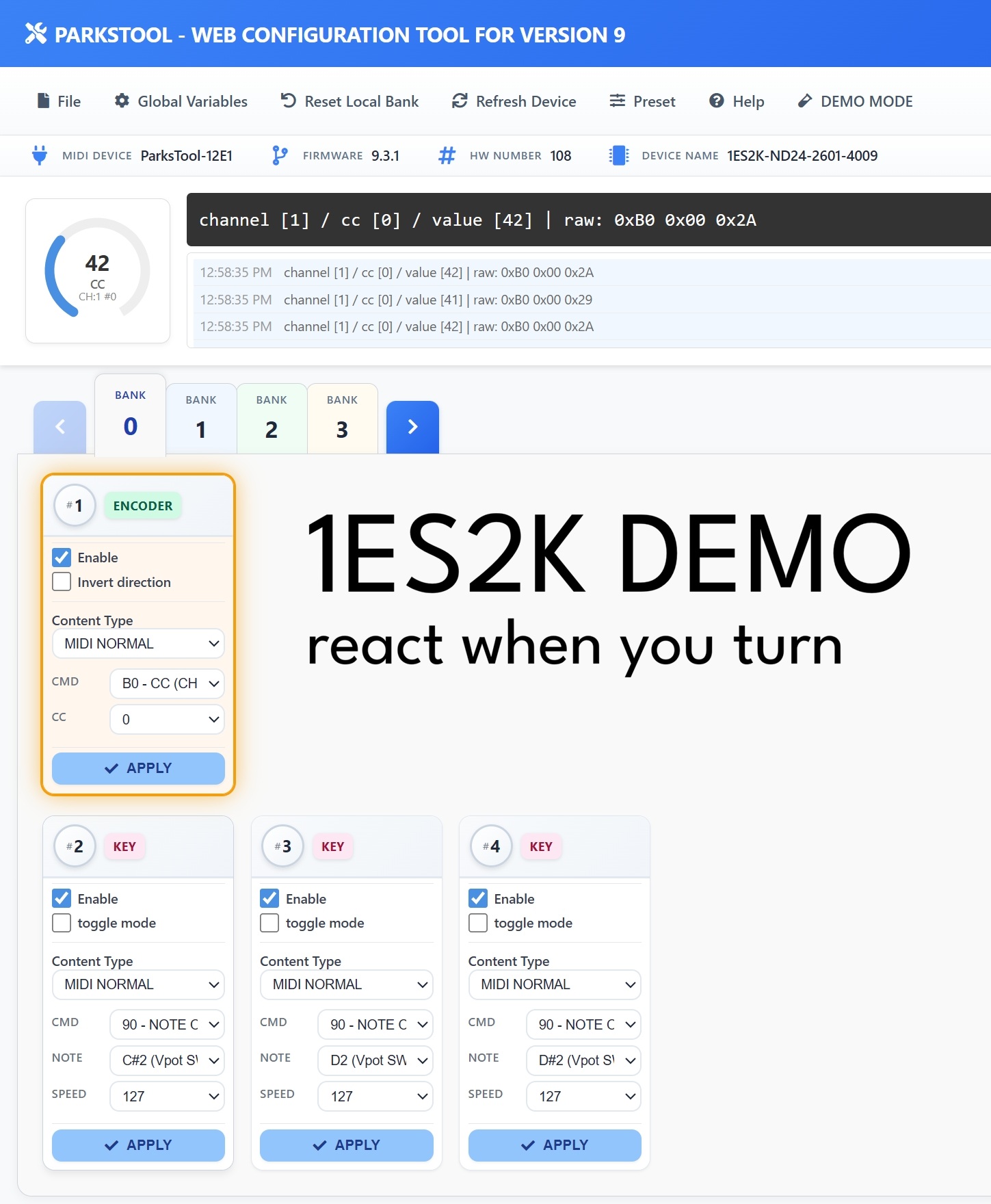
The screenshot above is an example based on the 1ES2K. The number and type of controls displayed (encoders, keys, faders, potentiometers) may vary depending on your product.
The web configuration tool consists of the following main areas:
Top Menu Bar
File — Save/load configuration files
Global Variables — Global settings including number of Banks and Bank Looping
Reset Local Bank — Reset the current Bank settings
Refresh Device — Reconnect the connected device
Preset — Load a pre-saved preset
Help — Help
DEMO MODE — Lets you explore the interface without a connected device. Useful for previewing features before purchase or practising your configuration.
Device Info Bar
Information about the connected device is displayed in a single line:
MIDI DEVICE — The MIDI device name recognised by your computer (e.g.
ParksTool-12E1)FIRMWARE — The current firmware version (e.g.
9.3.1)HW NUMBER — Hardware serial number
DEVICE NAME — Product SKU name (e.g.
1ES2K-ND24-2601-4009)
MIDI Monitor
MIDI messages sent from the device are displayed in real time. The format is as follows:
channel [1] / cc [0] / value [42] | raw: 0xB0 0x00 0x2A
channel— MIDI channel number (1–16)cc— CC number (0–127)value— Current value (0–127)raw— Raw MIDI bytes transmitted (hexadecimal)
The log area records recent messages with timestamps, and the circular gauge on the left visually displays the current value, MIDI type, channel, and CC number.
Bank Tabs
Banks from 0 to N are displayed as tabs. Click a tab or use the arrow buttons to switch Banks. The tab highlighted in blue is the Bank currently being edited.
Control Cards
Each control is displayed as a card. The top of each card shows the control number (#1, #2, ...) and a type badge (ENCODER, KEY, FADER, POTENTIOMETER, etc.).
Settings available on each card:
Enable — Whether the control is active
Invert direction — Encoders, potentiometers, and faders only. Reverses the value direction.
Toggle mode — Keys only. Alternates between On and Off with each press.
Content Type — Select the type of MIDI message (MIDI NORMAL, PITCHBEND, etc.)
After making changes, you must press the APPLY button to save them to the device.
Tip
Orange border: The card of the control currently being physically operated is highlighted with an orange border in real time. When you turn a knob or press a key, the corresponding card is highlighted, making it easy to see which control you are using — especially helpful during configuration.
🔁 Bank 関連追加説明
デフォルトでは2つのBankが提供され、Web Configuration ToolのGlobal Variablesタブでbank数を変更できます。
エンコーダー では物理的なクリックのあるディテントタイプがBank切り替えに推奨されます。
Bank Loopingを有効にすると、最後のBankから再び最初のBankに循環します。単一ボタンデバイスで有用です。
各Bankは使用前に設定が必要です。
ポテンショメーター製品群もbankを変更できます。他のbankもbank featureとして設定しておくことを推奨します。そうでないと、bank変更後にその要素はもはやbank changeとして動作せず、一般的なmidiモードになるためです。
🔢 USB PID の変更 (同じ PC で 2 台同時に使う場合)
同じモデルの ParksTool デバイスを 2 台以上同じ PC に同時接続するには、各デバイスの USB PID (製品識別番号) が互いに異なっている必要があります。PC が 2 台を同じデバイスと認識すると、片方が認識されなかったり、入力が混ざる恐れがあるからです。
変更方法:
変更するデバイスを 1 台だけ PC に接続した状態で Web Configuration Tool を開きます。
上部メニューバーの Global Variables を開きます。
USB PID の項目で使用する番号を選びます。
適用するとデバイスが自動的に再接続され、新しい番号で認識されます。
1 台目を取り外して 2 台目を接続し、同じ手順で別の番号を割り当てます。
注釈
各 ParksTool 製品で使用できる番号は 15 種類あります。2 台以上使用する際は、互いに異なる番号を割り当てるだけで構いません。
この機能はファームウェア 9.3.5 以降でのみ利用可能です。
🔧 製品名が実際と違って表示されるとき(ハードウェア番号の設定)
症状
ファームウェア更新後、デバイス情報に表示される製品名が、実際に購入した製品と異なって見えることがあります。たとえば エンコーダー2個の製品なのに、まったく別の名前(例: ``1ES-ND24-2300``)として認識される といった具合です。主に初期に製造されたユニットで発生します。
原因
デバイスには、それがどの製品かを示す「製品プロファイル番号」が保存されていますが、古いユニットではこの番号が実際の製品とずれていることがあります。ハードウェア自体は正常で、正しいプロファイルを設定し直せば、名前とノブ/キーのマッピングが製品に合わせて復元されます。
解決方法
デバイスを USB で接続し、Web Configuration Tool を開きます。
上部メニューバーの Global Variables を開きます。
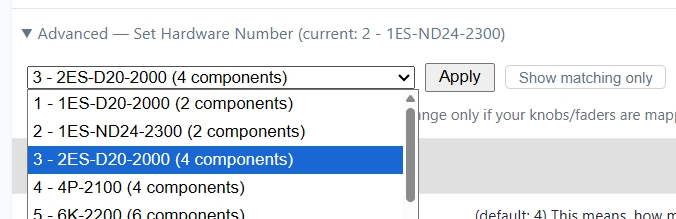
Device information の項目で Advanced — Set Hardware Number を展開します。現在認識されている番号と名前が一緒に表示されます。
デフォルトでは、お使いのユニットと部品数が同じ製品のみが表示されます。リストに実際の製品がない場合は、Show all profiles ボタンを押して全リストを表示します。
実際の製品に対応する番号を選び、Apply を押して確認します。設定はデバイスに保存され、電源を切っても保持されます。
最後に ParksTool Uploader の Auto Update を一度実行すると、その製品に合ったファームウェアがインストールされ、名前とマッピングが正常に戻ります。
注釈
ほとんどのユーザーはこの機能を使う必要はありません。表示される製品名が実際と異なる場合や、ノブ/フェーダーのマッピングがおかしい場合のみ使用してください。どの番号を選べばよいか分からない場合は、ParksTool までお問い合わせください。
マッピングとユーザー設定
✨ 基本マッピング機能
Web Configuration Toolを通じてキー、ノブ、メディアキーなどを自由にマッピングできます。
製品を接続した状態でWebブラウザで設定ページを開くと自動的に認識されます。
Per-Component Additional Settings
Each component (PEK) supports the following settings in addition to Content Type.
Invert direction: Reverses the value direction for encoders, potentiometers, and faders. Does not apply to keys.
Toggle mode: Key only. When enabled, each key press alternates between On and Off. (Not shown in BANK FEATURE mode.)
REPEAT: Available in Keyboard / Consumer Control / Mouse modes. Sets how many times the input is repeatedly transmitted when a key is pressed once. For example, setting it to 5 will send the key input 5 times with a single press. Configurable from 1 to 60.