Konfiguration
Dieses Produkt kann über das Web-Konfigurationstool (https://config.parkstool.com) frei angepasst werden. Um Funktionen zu ändern, müssen Sie das Web-Konfigurationstool verwenden, um die Einstellungen zu ändern.
Warnung
MIDI controller functionality (playing, CC/Note transmission, etc.) works normally on all platforms. However, configuration changes via the Web Configuration Tool are PC only.
iOS / iPadOS: Apple WebKit does not support the Web MIDI API, so the Web Configuration Tool is unavailable on all browsers.
For configuration changes, please use a PC (Windows or Mac) with Chrome or Edge browser.
Interface Overview
Bemerkung
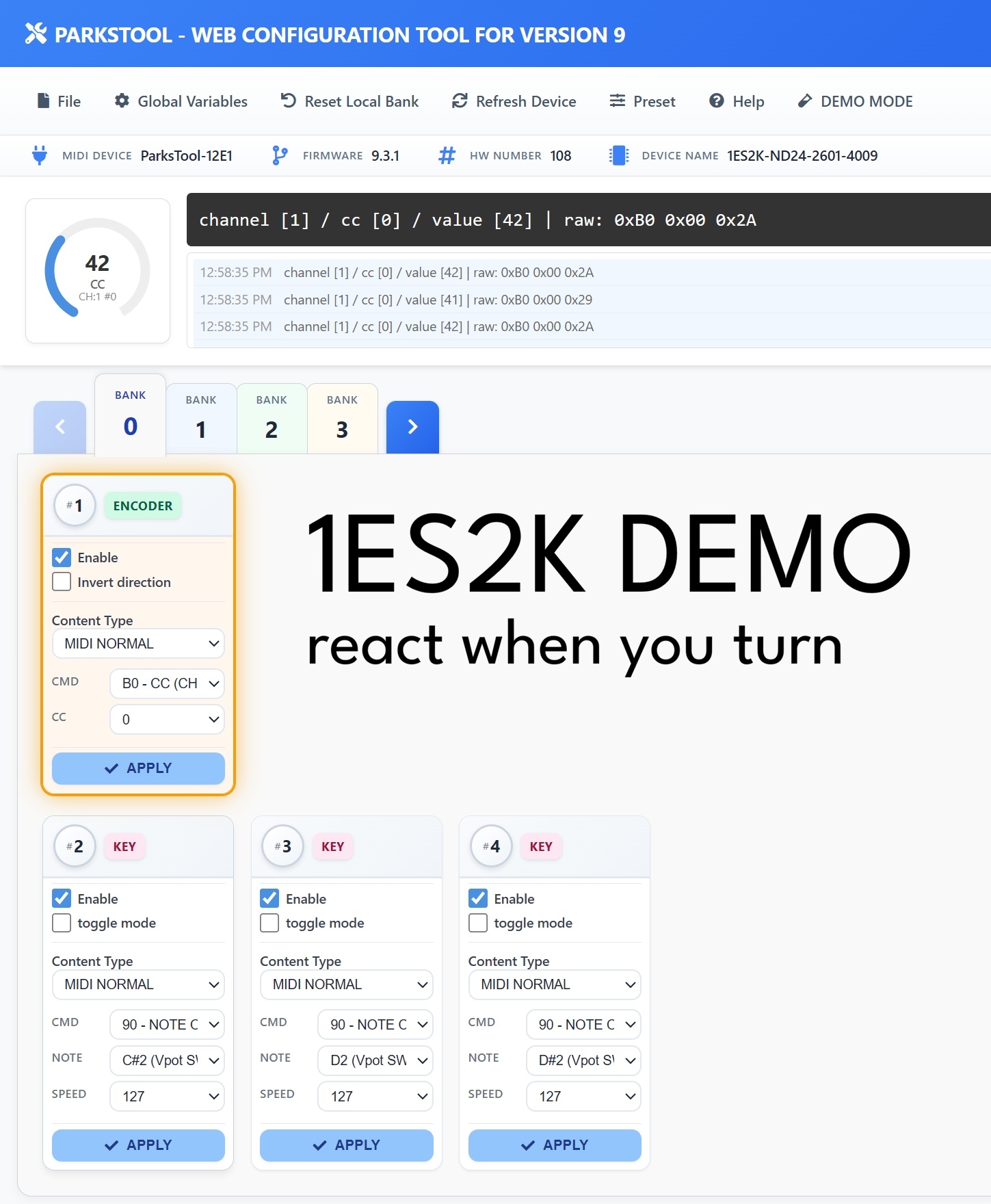
The screenshot above is an example based on the 1ES2K. The number and type of controls displayed (encoders, keys, faders, potentiometers) may vary depending on your product.
The web configuration tool consists of the following main areas:
Top Menu Bar
File — Save/load configuration files
Global Variables — Global settings including number of Banks and Bank Looping
Reset Local Bank — Reset the current Bank settings
Refresh Device — Reconnect the connected device
Preset — Load a pre-saved preset
Help — Help
DEMO MODE — Lets you explore the interface without a connected device. Useful for previewing features before purchase or practising your configuration.
Device Info Bar
Information about the connected device is displayed in a single line:
MIDI DEVICE — The MIDI device name recognised by your computer (e.g.
ParksTool-12E1)FIRMWARE — The current firmware version (e.g.
9.3.1)HW NUMBER — Hardware serial number
DEVICE NAME — Product SKU name (e.g.
1ES2K-ND24-2601-4009)
MIDI Monitor
MIDI messages sent from the device are displayed in real time. The format is as follows:
channel [1] / cc [0] / value [42] | raw: 0xB0 0x00 0x2A
channel— MIDI channel number (1–16)cc— CC number (0–127)value— Current value (0–127)raw— Raw MIDI bytes transmitted (hexadecimal)
The log area records recent messages with timestamps, and the circular gauge on the left visually displays the current value, MIDI type, channel, and CC number.
Bank Tabs
Banks from 0 to N are displayed as tabs. Click a tab or use the arrow buttons to switch Banks. The tab highlighted in blue is the Bank currently being edited.
Control Cards
Each control is displayed as a card. The top of each card shows the control number (#1, #2, …) and a type badge (ENCODER, KEY, FADER, POTENTIOMETER, etc.).
Settings available on each card:
Enable — Whether the control is active
Invert direction — Encoders, potentiometers, and faders only. Reverses the value direction.
Toggle mode — Keys only. Alternates between On and Off with each press.
Content Type — Select the type of MIDI message (MIDI NORMAL, PITCHBEND, etc.)
After making changes, you must press the APPLY button to save them to the device.
Tipp
Orange border: The card of the control currently being physically operated is highlighted with an orange border in real time. When you turn a knob or press a key, the corresponding card is highlighted, making it easy to see which control you are using — especially helpful during configuration.
🔁 Bank bezogene zusätzliche Erklärung
Standardmäßig werden 2 Banks bereitgestellt, und Sie können die Anzahl der Banks im Global Variables Tab des Web Configuration Tools ändern.Standardmäßig werden 2 Banks bereitgestellt, und Sie können die Anzahl der Banks im Global Variables Tab des Web Configuration Tools ändern.
Encoder mit physischen Rastpunkten (Detent-Typ) werden für Bank-Umschaltung empfohlen.
Wenn Bank Looping aktiviert ist, wird von der letzten Bank wieder zur ersten Bank gewechselt. Nützlich bei Einzel-Button-Geräten.
Jede Bank benötigt Konfiguration vor der Verwendung.
Potentiometer-Produktgruppen können auch Banks ändern. Es wird empfohlen, andere Banks als Bank Feature zu konfigurieren. Andernfalls funktioniert das Element nach dem Bank-Wechsel nicht mehr als Bank Change und wird zu einem normalen MIDI-Modus.Potentiometer-Produktgruppen können auch Banks ändern. Es wird empfohlen, andere Banks als Bank Feature zu konfigurieren. Andernfalls funktioniert das Element nach dem Bank-Wechsel nicht mehr als Bank Change und wird zu einem normalen MIDI-Modus.
🔢 USB-PID ändern (bei gleichzeitiger Nutzung zweier Geräte)
Um zwei oder mehr ParksTool-Geräte desselben Modells gleichzeitig an denselben PC anzuschließen, müssen die USB-PIDs (Produkterkennungsnummern) der Geräte unterschiedlich sein. Andernfalls erkennt der PC sie als dasselbe Gerät — eines wird möglicherweise nicht erkannt, oder die Eingaben werden vermischt.
So ändern Sie die PID:
Schließen Sie nur das Gerät, das geändert werden soll, an den PC an und öffnen Sie das Web Configuration Tool.
Öffnen Sie Global Variables in der oberen Menüleiste.
Wählen Sie unter USB PID die zu verwendende Nummer.
Nach dem Anwenden verbindet sich das Gerät automatisch neu und wird mit der neuen Nummer erkannt.
Trennen Sie das erste Gerät, schließen Sie das zweite an, und weisen Sie ihm nach demselben Verfahren eine andere Nummer zu.
Bemerkung
Jedes ParksTool-Produkt bietet 15 verfügbare Nummern. Bei zwei oder mehr Geräten genügt es, jeder Einheit eine eigene Nummer zuzuweisen.
Diese Funktion steht nur auf Firmware 9.3.5 oder neuer zur Verfügung.
🔧 Wenn der Produktname falsch angezeigt wird (Hardware-Nummer einstellen)
Symptom
Nach einem Firmware-Update kann der in den Geräteinformationen angezeigte Produktname von dem tatsächlich gekauften Produkt abweichen. Zum Beispiel kann ein Produkt mit zwei Encodern unter einem völlig anderen Namen erkannt werden (z. B. ``1ES-ND24-2300``). Dies tritt vor allem bei früh gefertigten Geräten auf.
Ursache
Das Gerät speichert eine „Produktprofilnummer“, die angibt, um welches Produkt es sich handelt. Bei älteren Geräten kann diese Nummer nicht mehr mit dem tatsächlichen Produkt übereinstimmen. Die Hardware selbst ist in Ordnung — sobald das richtige Profil wieder eingestellt ist, werden der Name und die Knopf-/Tastenzuordnung passend zum Produkt wiederhergestellt.
So beheben Sie es
Schließen Sie das Gerät per USB an und öffnen Sie das Web Configuration Tool.
Öffnen Sie Global Variables in der oberen Menüleiste.
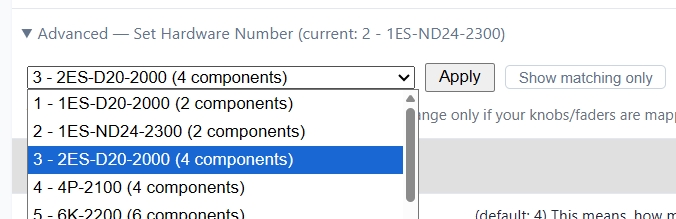
Erweitern Sie unter Device information den Punkt Advanced — Set Hardware Number. Dort werden die aktuell erkannte Nummer und der Name angezeigt.
Standardmäßig werden nur Produkte mit derselben Anzahl an Bedienelementen wie Ihr Gerät angezeigt. Wenn Ihr tatsächliches Produkt nicht in der Liste steht, klicken Sie auf die Schaltfläche Show all profiles, um die vollständige Liste anzuzeigen.
Wählen Sie die Nummer, die zu Ihrem tatsächlichen Produkt passt, klicken Sie auf Apply und bestätigen Sie. Die Einstellung wird im Gerät gespeichert und bleibt auch nach dem Ausschalten erhalten.
Führen Sie schließlich im ParksTool Uploader einmal Auto Update aus. Es installiert die zum Produkt passende Firmware, und Name und Zuordnungen kehren zum Normalzustand zurück.
Bemerkung
Die meisten Benutzer benötigen dies nie. Verwenden Sie es nur, wenn der angezeigte Produktname nicht mit Ihrem tatsächlichen Produkt übereinstimmt oder die Drehregler/Fader falsch zugeordnet erscheinen. Wenn Sie nicht sicher sind, welche Nummer Sie wählen sollen, wenden Sie sich bitte an ParksTool.
Mapping und Benutzereinstellungen
✨ Grundlegende Mapping-Funktionen
Über das Web Configuration Tool können Sie Tasten, Knöpfe, Medientasten usw. frei zuordnen.
Wenn Sie bei angeschlossenem Produkt die Konfigurationsseite im Webbrowser öffnen, wird es automatisch erkannt.
Per-Component Additional Settings
Each component (PEK) supports the following settings in addition to Content Type.
Invert direction: Reverses the value direction for encoders, potentiometers, and faders. Does not apply to keys.
Toggle mode: Key only. When enabled, each key press alternates between On and Off. (Not shown in BANK FEATURE mode.)
REPEAT: Available in Keyboard / Consumer Control / Mouse modes. Sets how many times the input is repeatedly transmitted when a key is pressed once. For example, setting it to 5 will send the key input 5 times with a single press. Configurable from 1 to 60.